

The National Cyber Security Centre (NCSC) of Ireland has issued a caution regarding a rising wave of scams involving WhatsApp verification codes that are targeting users.
These deceptive schemes not only jeopardize personal accounts but are also being exploited to steal payments and confidential information. Here’s what you need to be aware of to safeguard yourself.
How This Scam Operates
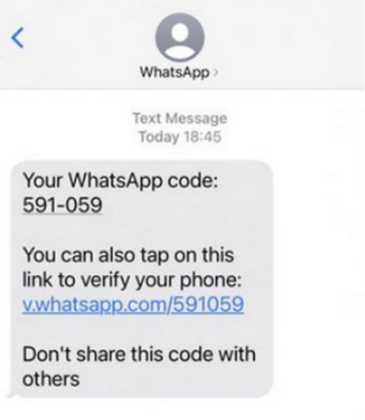
The scam starts with the perpetrator obtaining a victim’s phone number. They input this number into WhatsApp’s login screen, prompting the app to send a verification code to the victim’s phone.
The scammer, masquerading as a trusted contact, then reaches out to the victim via WhatsApp, creating a sense of urgency and requesting the verification code.
This deception works because the scammer has previously compromised an account belonging to someone the victim knows. Once the victim provides the verification code, the scammer gains access to their WhatsApp account. This can result in the victim being locked out, further spread of the scam, or exploitation of the victim’s contact list.
The fallout can be severe, leading to further security breaches and potential financial or personal damage.
How to Protect Yourself
To defend against these scams, the NCSC advises the following preventive measures:
- Keep Your Verification Code Confidential: Consider your WhatsApp verification code as private as a password. Never share it with anyone. WhatsApp will not ask for this code directly.
- Enable Two-Step Verification: For enhanced security, turn on two-step verification. This feature adds an extra layer of protection by requiring both a PIN and a verification code. You can set this up in WhatsApp by navigating to Account > Two-step verification.
- Be Wary of Urgent Requests: Even if a message appears to come from someone you know, be cautious of urgent requests for money or sensitive data. Always verify the sender’s identity through a phone call or another reliable method.
- Report and Block Suspicious Activity: If you receive dubious messages or come across suspicious accounts, report them through WhatsApp. Press and hold the message, select “Report,” and follow the instructions provided.
If you believe your account has been compromised, reach out to WhatsApp support immediately at support@whatsapp.com. The NCSC stresses the importance of remaining vigilant and informed to defend against these evolving cyber threats.


